
Good to see you again
Video from: http://www.youtu.be/watch?v=npZTlJNHpKc
while 1: yield None
Getting Old:
Laying on your bed, with hands behind your head, while watching the latest South Park episode "You're Getting Old" ended with Stan doing exactly the same thing.
今天 你對我說 "eh, u start ur own blog la"
由於我行事一向來都超低調 開了個blog這麼久 也沒對任何人講起
所以 不知道這blog的存在 完全就是一件正常不過的事
BUT! 人生最賤格的就是這個BUT! 全宇宙就只有你有收過我不小心用@sayap.com送出去的email 而且還回我"要咩"
竟然沒有copy paste 竟然沒有copy paste 竟然沒有copy paste 竟然沒有copy paste 竟然沒有copy paste 竟然沒有copy paste 竟然沒有copy paste 竟然沒有copy paste 竟然沒有copy paste 竟然沒有copy paste 竟然沒有copy paste 竟然沒有copy paste 竟然沒有copy paste 竟然沒有copy paste 竟然沒有copy paste 竟然沒有copy paste 竟然沒有copy paste 竟然沒有copy paste 竟然沒有copy paste 竟然沒有copy paste 竟然沒有copy paste 竟然沒有copy paste 竟然沒有copy paste 竟然沒有copy paste 竟然沒有copy paste 竟然沒有copy paste 竟然沒有copy paste 竟然沒有copy paste 竟然沒有copy paste 竟然沒有copy paste 竟然沒有copy paste 竟然沒有copy paste 竟然沒有copy paste 竟然沒有copy paste 竟然沒有copy paste
* facepalm *
當時 為了掩飾你很白痴的事實 我也只好假裝沒看見那一句 反正隨時可以賴給bug 10495
我這麼用心良苦 所以你不可以怪我為何把那一句給skip了 更加不可以打我 (理直氣壯ing)
Anyway 人生第一條中文post 獻給很傻很天真的你
OpenWrt is a sweet distro for wireless routers. However, doing certain stuffs with it, e.g. setting up OpenVPN, is not an easy task. There are many wiki pages, forum threads, and blog posts to help us mortal to get OpenVPN running, but most of them involves a blood sacrifice to the God of Iptables as the mandatory first step. Iptables?? Surely there must be a less painful way?
After some trials and errors, I managed to get OpenVPN to work on OpenWrt, without typing any iptables command. Not everything can be done via the Luci web interface though, so expect to get your hands dirty with the command line. With that said, here are the steps for the typical road warrior setup (tested on Backfire 10.03).
SSH into the router, and install the necessary packages
opkg update
opkg install openvpn luci-app-openvpn openvpn-easy-rsa
Apply changeset 21641 manually. The change went in on 2010-05-31, so Backfire 10.03 doesn't have it. See this forum thread for more info.
nano /etc/hotplug2-common.rules
# remove the "next" line in the tun/tap section
Generate the keys following this excellent guide from OpenVPN.
nano /etc/easy-rsa/vars
# Scroll to the bottom and put in the country, province, city, organization, and email
build-ca
build-dh
build-key-server server
build-key-pkcs12 client1
Copy the following files into /etc/openvpn/. This is the default location, so they will get picked up automatically later.
cd /etc/easy-rsa/keys
cp ca.crt ca.key dh1024.pem server.crt server.key /etc/openvpn/
Copy client1.p12 to the client machine (i.e. the road warrior). The client config file should look like this:
client
dev tun
proto udp
remote <server address> 1194
resolv-retry infinite
nobind
persist-key
persist-tun
pkcs12 client1.p12
comp-lzo
verb 3
ns-cert-type server
tls-client
tls-remote <the common name during the build-key-server step>
Open Luci web interface, go to Service -> OpenVPN, and enable sample_server. Click Save & Apply.
Click the edit icon for sample_server. Click the Swith to advanced configuration link. Click the VPN options tab. Select Push options to peer from the Additional Field list, and click Add. Then, select custom and type route 192.168.1.0 255.255.255.0 (change this accordingly if lan is not on 192.168.1.0/24).
Go to Network -> Interfaces. Type vpn in the box and click Add entry. Change Protocol to none, and change Interface to tun0. Click Save & Apply.
Go to Network -> Firewall -> Zones. Click Add entry, and type vpn as the Name. Change Incoming Traffic and Outgoing Traffic to accept, and select vpn in the Networks list. Click Save & Apply.
Go to Network -> Firewall -> Traffic Control. Click the upper Add entry button twice. Select lan as Source and vpn as Destination, and then reverse the order. Click Save & Apply.
Go to Network -> Firewall -> Traffic Control again. Click the lower Add entry button. Type openvpn as the Name, and change Source to wan. Then, select Protocol from the Additional Field list, and click Add. Change Protocol to UDP, and type 1194 as the Destination Port. Click Save & Apply.
We are done. Once openvpn is started on the client machine, it should be able to access all the lan machines, and vice versa.
As the first and only Maemo 5 device, Nokia N900 is simply amazing. Unlike other smartphones that give you thousands of silly Apps, with N900 you can have real, actual, full-length Applications.
For example, this screenshot below shows a fully ajax web application rendered and functioning nicely in the N900's MicroB browser:
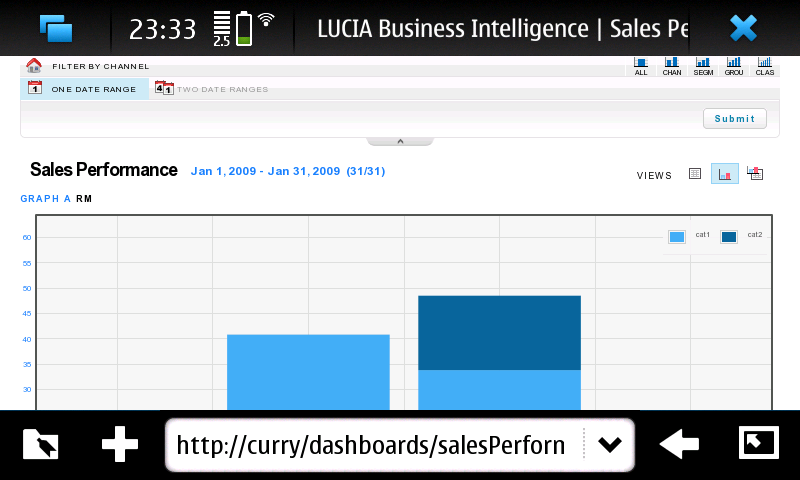
(Btw, that's our Business Intelligence Dashboards developed by my colleagues. Great work guys!)
Of course, this web application might be rendered and functioning nicely with other smartphones also. What seperates N900 from the appsphones, however, is that it can actually host the backend of the web application, all by itself.
In this case, the backend uses these services:
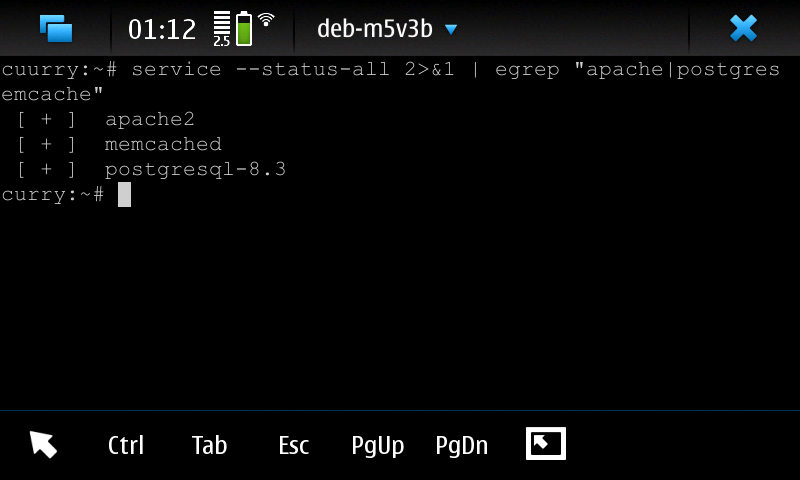
along with apache modules mod_wsgi and mod_php.
The speed isn't great, since N900's hardware spec is comparable to the laptop I had 10 years ago. Nevertheless, it works. So, screw Android with its non-standard Java and tiny SQLite database, I am going Maemo with N900 :D
Installing a contrib module for Greenplum must be a dead simple task, because it was no where to be found in the otherwise comprehensive Greenplum Admin Guide.
However, google for "greenplum contrib" only returns one relevant result to a Chinese blog post, which despite best intention, only serves to discourage a newbie like me from ever trying to install a contrib. Recompiling postgresql and hand-editing Makefile just to install a small module? That just doesn't sound right, even for a Gentoo user.
After some messing around with a few contrib, I finally found the right way, which is indeed dead simple:
su - gpadmin
make USE_PGXS=1 COPT="-Wno-error" install
psql -f xxx.sql [DBNAME]
There you have it. Simple, no fluff, even an Ubuntu user can get it to work (seriously, I am not joking).
Safara 4 Beta was released early this week, with several prominent UI changes such as tab bar on top, speed dial, and history/bookmark search from address bar. Thom Holwerda of OSNews fame, an avid fan of Google Chrome, soon tested the Beta and regarded it as a UI disaster. However, in doing so, Thom has made himself a hypocrite.
Thom's main beef with Safari 4 Beta is that the Safari team stole a fantastic idea from Chrome, bastardized it, and claimed it as their own. Here's what he said:
To me, it seems like Apple had heard that "Chrome has tabs on top", but instead of just being honest and admitting that Google got it right, they set a goal for themselves to make as many arbitrary and useless changes as possible so they could still claim they were innovating.
What Thom failed to realize is that the Chrome team stole not one, but two fantastic ideas from Opera, bastardized them, and claimed them as their own. By that, of course I mean tab bar on top and speed dial.
Opera has had tab bar on top by default for years, and has done it in the right way. You see, in Opera, it is not just about having the tab bar "on top". You can put the tab bar on any of the 4 edges of the window (top, left, bottom, right), and the point is that anything at the opposite side of the tab bar belongs to the tab. The back button, the search box, the page itself, anything at the opposite side of the tab bar belongs to the tab. There is nothing special about this design decision, even though Chrome and Safari both try to make a big deal out of it. If you design a tabbed browser from the ground up rather than retrofitting tabs to a prehistoric browser (ahem, Firefox), this is the only sensible design. This is what Fred Brooks mean by conceptual integrity.
And then we have speed dial, a great feature introduced by Opera about 2 years ago. When you open up a new tab, you will be presented with 9 numbered squares, and you can assign a website to each of the square. Clicking on an unassigned square will pop out a selection list with the top 10 most frequently visited sites and all currently opened sites, followed by a shortened address bar where you can enter a URL manually (with history and auto completion). Clicking on an assigned square or using the shortcuts of CTRL + 1-9 will then bring you to the site.
As you can see, these are 2 fairly simple ideas. There is little room for other browsers to show their innovative touch here, but the Chrome team managed to do it anyway. Kudos. So what they did to the tab bar? It was placed not just on top, but on the very top -- it got merged with the title bar.
At first glance, Chrome merely copied the tab bar on top idea and made a few tweaks. Unfortunately, the tweaks it made violate the principle behind the idea, which is a clear separation of the tab bar and the tab's content. Let's use the bookmarks bar as the example here. In Opera, the bookmarks bar, if enabled, appears above the tab bar (below the menu bar, to be exact, since the tab bar can be placed at other edges). In Chrome, the bookmarks bar appears below the tab bar (below the address bar, to be exact). Is there anything about the bookmarks bar that is specific to the current tab? Nothing. It is global. If you add a bookmark, each Chrome tab in each Chrome window will have the entry in its bookmarks bar. When a global control like this appears in the per-tab content area, it breaks conceptual integrity.
In a tabbed browser environment, there are always things that are global to the whole browser, and things that are local to a particular tab. By being innovative and merging the tab bar with the title bar, Chrome leaves no room for the former. It cannot say to the users that whatever they do in one tab will not affect the other tabs, because it will.
You may argue that this is the correct design for Chrome, given that Chrome spawns a new process for each tab, so a tab can stand on its own as a full application, and all controls can be local to the tab. Well, explain to me why there are 2 chrome.exe processes if I open 1 tab, and 3 chrome.exe processes if I open 2 tabs? That's right, because one of them is the global process. You can't run away from that. Anyway, tying the UI to the implementation details is usually a bad idea, so this has little merit to begin with.
The merging has other implications as well. In Opera, I can double click on the title bar to maximize/restore the window, and I can double click on the tab bar to open a new tab. Chrome can only cater to one of these, and it picked the title bar. That's definitely a sane decision, one that I believe will be made by most people when faced with the question. But why put yourself in the situation to make such a decision in the first place? Why can't we have both?
And what will happen when Chrome get ported to Linux? Unlike the Windows land, there are proper Windows Managers in Linux (ironically). A well-behaved Linux application doesn't mess with the title bar. I have hundreds of applications installed, and not one of them mess with the title bar. Even Dialo 2, when played in windowed mode, has a proper title bar. If Chrome team decides to make the Linux version a good citizen (e.g. relying on something like Netbook Plasma Theme), does that mean I can then double click on the tab bar? But that would make it inconsistent with the Windows version.
And what will happen when Chrome users with wide screens come to their senses and start demanding to have the tab bar at the left edge? Where shall the bookmarks bar be placed then, will the window be split horizontally first and then vertically, or the other way around? Has anyone in the Chrome team ever thought about this when the merging decision was made? Doesn't seem to.
Trying to be too clever with the title bar has put Chrome in a lose-lose situation when it comes to porting to multi-platforms and adapting to changes.
Meanwhile, if the reason behind the merging is to have more screen real-estate for the actual web page, it baffles me why Chrome still doesn't support the full-screen mode. The saving of 20 or so vertical pixels due to the merging is definitely nice, but if I am using a so-called netbook with a limited screen size of 1024x600, I'd definitely love to have the ability to use all 1024x600 pixels for browsing purpose.
Well, enough about the tab bar, let's move on to the next idea bastardized by Chrome, the speed dial. While the Chrome team can claim that they came across the novel idea of tab bar on top all on their own, anyone with or without a clue knows that the "Most visited" page in Chrome came from Opera's speed dial. As I mentioned earlier, this is a very simple idea, one that makes you go "Ah, why didn't I thought of this before" when you first use it. There is almost no room to implement it wrongly, but the Chrome team somehow managed to strike again.
Ok, imagine this. You have a phone that remembers the numbers you have dialed and how frequent you dialed them. Then, every time you press that big fat button on the phone, it will bring up a screen with the 9 most frequently dialed numbers. While in this screen (and only in this screen), pressing 1-9 will then dial the corresponded number for you.
How useful will that be? Well, the answer depends. If you are the kind of person such that every time you flip open the phone, you'd like to see who have you been calling most frequently before deciding who to call, then this feature is a godsend for you. If, however, you are the kind of person that do not have the aforementioned mental disease, this feature is totally useless.
The speed dial, in both phones and browsers, serves a useful purpose. It lets you put something you deem as important at a prominent place, and allows you to reach it with the least effort. It has nothing to do with frequency. You may have speed dial #1 associated with that particular girl's phone number, using it once a year just to confirm that she is not dead yet. Your speed dial, your choice.
In comparison, the most visited page is way smarter. It determines what appears on the page for you, because it is smarter than you. It determines the order things appear on the page for you, because it is smarter than you. You do not have the ability to quickly go to your top favorite site (e.g. sayap.com) by pressing CTRL + 1 from any tab, because you are not smart enough to determine the order. If, like most people, you have been using Google Search most frequently, then you have no choice but to crown it as the super universe page number one (pronounced with Japanese accent). If you just come across a fantastic site (e.g. sayap.com) after using Chrome for 6 months, you can't make it appear in the most visited page other than launching a Chrome DDOS attack to the site. Of course, the site owner would then have to take down the site, leaving you with another useless entry in the most visited page.
To be fair though, I believe that the most visited page feature did indirectly give us something very useful. Firstly, ask yourself this: how could such a useless feature get past user testing? Well, the only reasonable explanation goes like this. A bunch of guys were given Chrome to beta test for a week. After a week, in each of these guys Chrome installation, the most visited page was invariably filled with porn sites. This, of course, can be a major convenience, provided no one else will be using your computer. To overcome this shortcoming, the Chrome team gave birth to something that solves the common problem faced by at least 50% of the mankind -- the infamous incognito mode (a.k.a the porn mode). At this point, the testers became too busy to test this new feature (who can blame them), and nobody give a damn anymore to the most visited page, which got to stay in the browser. Makes perfect sense, isn't it ;)
So, to recap, the Chrome team stole some fantastic ideas from Opera, bastardized them, and claimed them as their own (just read the last page of the comic if you disagree with this statement)
However, unlike Thom, my main beef with Chrome is not that the team stole some fantastic ideas from Opera, bastardized them, and claimed them as their own. No, it is not.
My main beef with Chrome is that the team stole some fantastic ideas from Opera, bastardized them, claimed them as their own, and still shamelessly regarded themselves as making some new open standards and asked others to follow suit and copy from them.
The way I see it, the only new standard set by Chrome is that it is now perfectly fine to steal ideas from others without credit, bastardize them however you want, and still feel good about yourself. Incidentally, this standard is being followed closely by the Safari team, as proven by Safari 4 Beta that comes with a combo tab/title bar that is completely unusable and a "Top Sites" page that apparently "will change to match your evolving tastes". Marvelous.
The Safari team deserves at least a pat on the back from Thom for a job well done.
P.S. This post may make it seems like I consider Chrome as a bad product. Actually, I think it is pretty good. If you work on Chrome, in particularly the backend components such as the multi-process architecture and the javascript engine, I think you are indeed very cool. If you work on Chrome and your name happens to be Ben Goodger or Chris DiBona, well, you sucks.
As a follow up to my previous post, I am going to rant about my poor experience with screenscraping. Although the xmltv grabber, in its current incarnation, works with listings from The Star and Astro, the script was initially written to target the official websites for TV3/NTV7/8TV/TV9 (Media Prima) and RTM1/RTM2 (RTM).
To understand why the idea was ditched, here's a sample line of html from TV3:
<td><a id="plcRoot_Layout_zoneCenter_ContentPlaceHolder_partPlaceholder_Layout_zoneScheduleContent_TV3ScheduleContent_ScheduleMain1_dlScheduleToday_ctl04_lnkShow" title="Date: Aug 19, 2008<br>Time: 10:00 AM - 10:02 AM" class="ScheduleLink" onmouseover="this.T_STICKY=false;this.T_WIDTH=300;this.T_FONTCOLOR='#000000';this.T_FONTFACE='Verdana';this.T_PADDING=5;this.T_BGCOLOR='#FFFFFF';this.T_TITLE='BERITA TERKINI';this.T_STATIC=true;return escape('Date: Aug 19, 2008<br>Time: 10:00 AM - 10:02 AM');" href="/Shows/MainNormal.aspx?MasterID=258&ShowID=322&MenuID=1&TemplateID=3">BERITA TERKINI</a></td>
It contains an id that is 150 characters long, multiple unescaped closing angle brackets, and some funky onmouseover code. Truely thedailywtf.com material. Oh ya, the html file with little content approaches 100K in size.
TRWTF about Media Prima websites, however, is the lack of consistency. All 4 sites appear to be running the same ASP.NET app, but subtly, each one is different:
It is Schedules.aspx on TV3 and NTV7, ScheduleToday.aspx on 8TV, and Schedule.aspx on TV9.
To get today schedules, you need to pass in query string parameter view=today to TV3, NTV7, and TV9. 8TV, of course, doesn't need it.
NTV7 only contains partial listing and will truncate shows that have been aired from the list. TV9 contains partial listing but doesn't truncate. TV3 and 8TV contain full listing and doesn't truncate. IMHO, Media Prima should change one of them to contain full listing with truncation. Then we will have a permutation.
If you feel adventurous, you can probably get around the truncation by simulating ASP.NET's postback and using the lovely calendar widget that has number-of-days-since-2000-01-01 as its parameter. If you feel adventurous, and have too much time in your hands.
Bashing aside, one good thing about Media Prima is that they are not afraid to show you what's under the hood. I just checked the 8tv schedules and was presented with this error message, embedded in the page:
[Error loading the WebPart '8TVScheduleSubNavi']
C:\Inetpub\wwwroot\mediaprima\8tv\CMSWebParts\8TV\Schedule\8TVScheduleSubNavi.ascx(17): error BC30451: Name 'LinkHelperClass' is not declared.
Awesome.
In comparison, RTM website is surprisingly good.
Both RTM1 and RTM2 pages are consistent to each other. This is a small feat, but I have to mention it.
The date parameter follows ISO8601, i.e. YYYY-MM-DD, unlike Media Prima websites that expect 3 parameters for day, month, and year. Kudos to the developers.
The page size is 6 times smaller compared to Media Prima.
The listing follows the newspaper day (i.e. from morning until the next morning), rather than the actual day (i.e. from midnight to midnight). This is good usability.
It has reliability issue at times -- RTM1 listing is blank since 2008-12-28.
As for Astro website, there is nothing much to talk about. Overall, it is just OK.
Pages are consistent.
The date parameter uses the format of DD-MON-YYYY.
A day of schedules is splitted into 2 pages, one for AM, one for PM. This is cumbersome not only for the script to scrape, but also for an actual person to read.
Things like No Transmission and Transmission Ends are included as shows with start time and duration. This isn't really necessary.
The size of the page is 3 times bigger compared to RTM.
The Star website has its goods and bads, but still, it is the best among the bunch.
Pages are consistent.
The date parameter uses the format of MM/DD/YYYY. Ugh.
The listing contains columns for description and episode. This is a major plus. However, the episode column contains a mix of English words and Arabic numerals. It has to be more consistent.
The listing follows newspaper day (duh).
It spells SpongeBob SquarePants correctly. Shame on you, Astro.
Lastly, the web designers for RTM/Media Prima/Astro/The Star really need to start learning how to use CSS to properly separate content from presentation. Seriously. Let's just start by giving a freaking id (that is less than 150 characters) to the freaking schedules tables, so that I don't have to rely on some bizzare bgcolor attributes to identify them. Amen.
Ever since I got mythtv up and running months ago, I have always wanted to use the Electronic Program Guide (EPG) feature. Unfortunately, getting tv schedules in a format understandable by mythtv (i.e. xmltv) is not so easy.
From a bit of googling, I found 2 (non-)solutions. The first one involves using tvxb through wine to grab tv schedules from Astro through screenscraping. Apparently, it doesn't work anymore, as the tvxb site is showing the following message:
All Astro satellite channels (No longer works - needs updating. 2008/10/12)
The other solution is a perl script written by Shahada Abubakar that also screenscrapes Astro listing. Like the first one, this solution has also ceased to be working, due to the flaky nature of screenscraping.
Of course, the googling and testing were just unnecessary foreplay. I was set at the beginning to come up with my own solution anyway. With the help of wonderful python libraries such as BeautifulSoup and lxml, I wrote a xmltv grabber that:
can screenscrape either Astro or The Star listings for channels rtm1, rtm2, tv3, ntv7, 8tv, and tv9
is functioning as of 2008-12-31
Here's the script: grabmy.py
To get it to work, install the requirements first:
easy_install BeautifulSoup lxml httplib2 python_dateutil
Then, run the script to generate a xmltv file:
python grabmy.py -f my.xml
Feed mythbackend with the file:
mythfilldatabase --file 1 my.xml
And finally, here's the EPG in its full glory if you channel-flip at 2am:
In the last few days, I got the chance to play with a bit of JavaScript at work. As someone who has near zero JavaScript experience, it appeared to me that it is a language with little conceptual integrity. Some examples:
Objects are associative arrays, but unlike arrays, they don't have any helper function or attribute (because objects are associative arrays). It says a lot about the language design when arrays have reduce() while associative arrays do not even have length.
There is no function overloading, and default parameter can't be specified either. Fear not - you are blessed with the magical arguments, and the warm and fuzzy feeling from coding a command line app.
JavaScript 1.8 added a lambda notation that gave the braces another meaning. A pair of braces create an object. A pair of braces also form a code block. If your have a one-line function followed by an opening brace, you need a return. Otherwise, you don't.
jQuery has a each function that associates a true return value as continue and a false return value as break. prototype has a each function that used to associate a $continue exception as continue and a $break exception as break. Desperately wanting a piece of "anonymous function does not always return a value" warning, it now associates any return value as continue.
Python got PEP8, Java got code convention, JavaScript got sparse style guides that do not conform to each other. Nobody seems to referring to them anyway.
In short, there is no equivalent word for Pythonic in the land of JavaScript. As a programming language, JavaScript is just like ManBearPig, with limbs and body parts from different animals attached together at random to create the ferocious monster.
Not unlike ManBearPig, people easily get confused when it comes to defining JavaScript. Is it half man-bear, half pig? Or is it half man, half bear-pig? Look at this question posted at stackoverflow, seeking the real identity of JavaScript:
There have been some questions about whether or not JavaScript is an object-oriented language. Even a statement, "just becuase a language has objects doesn't make it OO ".
Is JavaScript an object oriented language?
And here's my favorite answer with a +8 (emphasis mine):
Javascript is a multi-paradigm language that supports procedural, object-oriented (prototype-based) and functional programming styles.
Half man, half bear, half pig. That's a ManBearPig in my book.
Of course, by rephrasing a little, we can get a more correct answer:
JavaScript is a programming language that looks pretty much object-oriented, but aspiring to be a functional one, yet being used the most to create procedural code.
Trying to clean up the image of JavaScript, Douglas Crockford kept telling us that JavaScript is the world's most misunderstood programming language. Which is, of course, the same as saying ManBearPig is the world's most misunderstood animal. Duh. At least ManBearPig has a consistent name. No such luck with JavaScript.
Anyway, enough with the JavaScript bashing, which is not the point of this post. You see, this is all part of Al Gore's effort to spread ManBearPig awareness. Al Gore invented the Internet, which then gave birth to JavaScript that closely resembles the evilness of ManBearPig. He just wanted to subtlely tell the world how dangerous ManBearPig is, by giving us this reckless languauge called JavaScript. Thus, let me end this by saying:
"Thank you, Al Gore. You are super awesome."